

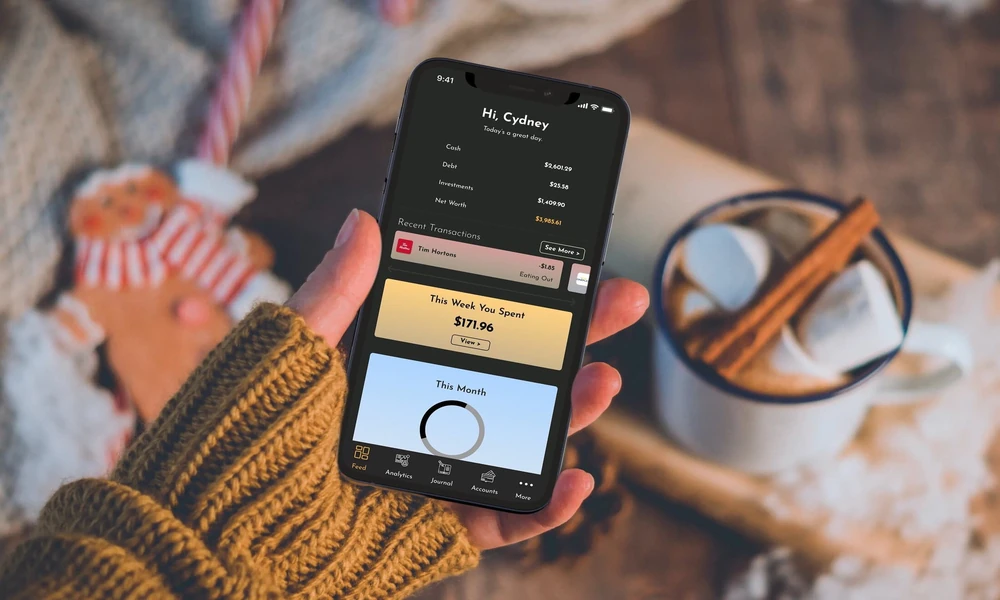
Managing money involves more than checking a bank balance. Individuals may need to track income, monitor spending, pay bills, review loans, maintain savings, and plan for future expenses. When these activities are handled across several platforms, it can become difficult to understand the complete financial position.
A finance app can bring important money-related information into one place. Depending on its purpose, the application may offer budgeting tools, payment reminders, savings trackers, loan details, credit information, and account summaries.
However, not every application is suitable for every user. The right choice depends on financial goals, security requirements, available features, charges, and the type of information the user is comfortable sharing.
Begin With a Clear Financial Need
Before downloading an application, users should identify the main problem they want to solve.
Some people need help tracking daily expenses. Others may want to organise bills, plan savings, monitor debt, or understand where their monthly income is being spent.
Common requirements include:
- Creating a monthly budget
- Monitoring bank balances
- Tracking loan instalments
- Setting savings targets
- Recording cash expenses
- Receiving bill reminders
- Reviewing credit information
- Comparing financial products
An application with several features may appear useful, but too many unnecessary tools can make the interface difficult to use.
Choosing a platform based on one or two important needs can make regular money management more practical.
Review the Dashboard Layout
The dashboard should provide a clear summary without overwhelming the user.
A useful home screen may show:
- Total account balance
- Monthly income
- Monthly expenses
- Upcoming payments
- Savings progress
- Outstanding debt
- Recent transactions
Important figures should be easy to understand. Users should not have to move through several pages to locate basic information.
Charts and visual summaries can help explain spending patterns, but they should be supported by detailed transaction records.
A clean dashboard can make it easier to identify unusual expenses, missed payments, or changes in monthly cash flow.
Check Budgeting Tools
Budgeting features help users decide how much money can be allocated to different categories.
Common categories may include:
- Housing
- Food
- Transport
- Utilities
- Education
- Healthcare
- Entertainment
- Savings
- Loan repayments
The application should allow users to create realistic limits based on actual income and regular expenses.
A budget should not be so strict that it becomes difficult to follow. It should include room for irregular costs, emergency needs, and seasonal expenses.
Some applications send alerts when spending approaches a category limit. These reminders can help users adjust before the month ends.
Evaluate Expense Tracking
Expense tracking should be simple enough to use consistently.
Transactions may be added manually or imported from linked accounts. Automatic categorisation can save time, but users should review whether entries are assigned correctly.
For example, a pharmacy transaction may be recorded as shopping instead of healthcare. Such errors can affect monthly reports.
The application should allow categories to be edited and custom labels to be created.
Users who frequently pay in cash should check whether manual entries can be added easily. A digital tracker is less useful when a large part of spending remains unrecorded.
Use Income Tracking for Better Planning
People with a fixed salary may receive a predictable amount each month. Self-employed individuals, freelancers, and business owners may have uneven income.
A suitable application should allow users to record income from different sources.
These may include:
- Salary
- Professional fees
- Business receipts
- Rental income
- Interest
- Incentives
- Part-time work
Tracking income separately from expenses can help users understand whether monthly spending is sustainable.
For irregular earners, planning should be based on a conservative average rather than the highest-earning month.
Set Practical Savings Goals
Savings tools can help users divide large financial targets into smaller contributions.
A goal may be created for:
- Emergency reserves
- Education
- Travel
- Home expenses
- Vehicle purchase
- Retirement
- Annual insurance payments
The application may show the amount already saved, the remaining amount, and the suggested monthly contribution.
Savings goals should have realistic timelines. If the required monthly contribution is too high, the target amount or deadline may need to be adjusted.
Users should also keep emergency savings separate from money intended for planned purchases.
Monitor Bills and Due Dates
Missed bills can lead to penalties, service interruption, or credit record problems.
A finance app may provide reminders for:
- Credit card payments
- Loan instalments
- Electricity bills
- Mobile bills
- Insurance premiums
- School fees
- Subscription renewals
Users should check whether reminders are customisable and whether the due date can be edited.
Notifications should be set early enough to allow time for payment. A reminder on the due date may not be sufficient when a transfer takes time to process.
Understand Loan Tracking Features
Loan tracking tools can help users see how much debt remains and how repayment affects monthly cash flow.
Useful details may include:
- Outstanding principal
- Interest rate
- Monthly instalment
- Remaining tenure
- Next due date
- Total interest payable
- Prepayment options
The application should not encourage users to focus only on the monthly instalment. A lower instalment may be linked to a longer tenure and higher total interest.
Borrowers should review the complete repayment schedule and verify all figures with the official loan statement.
Examine Credit Information Carefully
Some applications provide access to credit scores or credit reports.
Credit information may help users understand how lenders view their repayment behaviour. Factors may include payment history, outstanding debt, credit utilisation, and recent loan enquiries.
A score should not be treated as the only measure of financial health.
Users should also consider whether they have sufficient savings, manageable debt, stable income, and adequate insurance.
Any incorrect account or repayment entry should be reported through the appropriate credit reporting process.
Look for Clear Financial Summaries
Monthly summaries can help users identify patterns that may not be visible in daily transactions.
A useful report may show:
- Total income
- Total spending
- Savings rate
- Largest expense categories
- Changes from the previous month
- Recurring payments
- Debt obligations
These reports can support better finance decisions when users review them regularly and make practical changes based on actual behaviour.
For example, a report may show that several small subscriptions are creating a meaningful monthly expense. Cancelling unused services may free money for savings or debt repayment.
Review Data Access Permissions
Financial applications may request access to bank messages, transaction data, contacts, storage, or device information.
Users should check whether each permission is necessary for the feature being offered.
An expense tracker may need transaction data, but access to unrelated contacts or media files may not be required.
The privacy policy should explain:
- What information is collected
- Why it is collected
- How long it is stored
- Whether it is shared
- How users can request deletion
Users should avoid applications that do not clearly disclose how personal and financial information is handled.
Check Security Controls
Security should be a major selection factor because the platform may contain sensitive account details.
Important features may include:
- Two-factor authentication
- Biometric login
- Device verification
- Secure password reset
- Login alerts
- Automatic session timeout
Users should create a unique password and avoid using public devices for financial access.
One-time passwords, banking credentials, and personal identification numbers should never be shared with anyone claiming to offer support.
Applications should be installed only from verified sources.
Compare Charges and Subscription Plans
Some applications are free, while others charge for premium tools.
Possible paid features may include:
- Advanced budgeting reports
- Credit monitoring
- Financial consultations
- Automated account syncing
- Detailed tax summaries
- Product comparisons
Users should confirm whether a trial converts automatically into a paid plan.
The subscription cost should be compared with the actual value provided. A user who only needs simple expense tracking may not benefit from an expensive annual plan.
Cancellation and refund terms should also be reviewed before payment.
Avoid Product Recommendations Without Review
Some applications suggest loans, insurance products, investments, or credit cards.
These recommendations may be based on partnerships or commissions. Users should not assume that the first displayed option is the most suitable one.
- Interest rate
- Fees
- Lock-in conditions
- Repayment period
- Eligibility
- Risk
- Provider credibility
Financial product recommendations should be evaluated separately from the budgeting or tracking features of the application.
Use Alerts Without Creating Anxiety
Alerts can be helpful when they are linked to important actions.
Useful notifications may include:
- Low account balance
- Upcoming loan payment
- Budget limit reached
- Unusual transaction
- Savings target update
Too many notifications can make users ignore all messages.
Promotional alerts should be turned off when possible. The application should support better planning, not encourage unnecessary borrowing or spending.
Review Financial Progress Monthly
A monthly review gives users enough information to identify trends without reacting to every small transaction.
During the review, users can examine:
- Whether spending remained within budget
- Whether savings targets were met
- Whether debt reduced
- Whether income changed
- Whether any bills were missed
- Whether subscriptions remain useful
The next month’s budget can then be adjusted based on actual results.
Regular review is more effective than creating a detailed plan and never checking it again.
Keep Personal and Business Records Separate
Self-employed users and small business owners may need to separate household spending from professional expenses.
Combining both categories can make tax preparation and cash-flow analysis difficult.
A suitable application may allow separate wallets, profiles, labels, or accounts.
Business-related records may include client payments, equipment costs, travel expenses, taxes, and professional subscriptions.
Clear separation helps users understand whether personal income is supporting the business or whether business earnings are covering household expenses.
Match Borrowing Tools With the Correct Need
An application may display several credit products, but each borrowing need should be evaluated separately.
Short-term personal borrowing, business credit, housing finance, and agricultural borrowing have different eligibility rules and repayment structures.
Users considering a Farm Loan should review crop cycles, seasonal income, collateral terms, repayment timing, insurance requirements, and available institutional lending options before applying.
Conclusion
A finance app can support everyday money management by organising budgets, expenses, income, savings, bills, and debt information. Its value depends on whether the features match the user’s actual financial needs.
Before choosing a platform, users should review security, privacy permissions, charges, data accuracy, and product recommendations. Regular monthly reviews can help turn financial information into practical action.
The application should make money management clearer, not encourage unnecessary spending or borrowing. A simple tool used consistently is often more helpful than a complex platform that is rarely reviewed.
Frequently Asked Questions
1. Can a finance app replace a financial adviser?
No. It can help organise information and track goals, but complex decisions may still require guidance from a qualified professional.
2. Is it safe to link bank accounts to a financial application?
Safety depends on the platform’s security standards, permissions, data practices, and provider credibility. Users should review these factors carefully.
3. How often should a budget be updated?
A monthly review is suitable for many users, although it should also be updated after major changes in income or expenses.
4. Do expense trackers record cash payments automatically?
Usually not. Cash transactions may need to be entered manually unless the application provides another supported method.
5. Should users pay for a premium plan?
Only when the paid features provide clear value and are likely to be used regularly.
